Table of Contents
15. Sharps, Flats & Naturals
Theory Lesson: Stepping Outside the White Keys
Up until now, you've been playing in a purely natural world—sticking completely to the white keys. But the piano has 88 keys, and to unlock all those rich, colorful sounds, we need to step outside the basic alphabet. We do this using small symbols called Accidentals.
An accidental sits right next to a note and tells you to shift your finger to a different physical key:
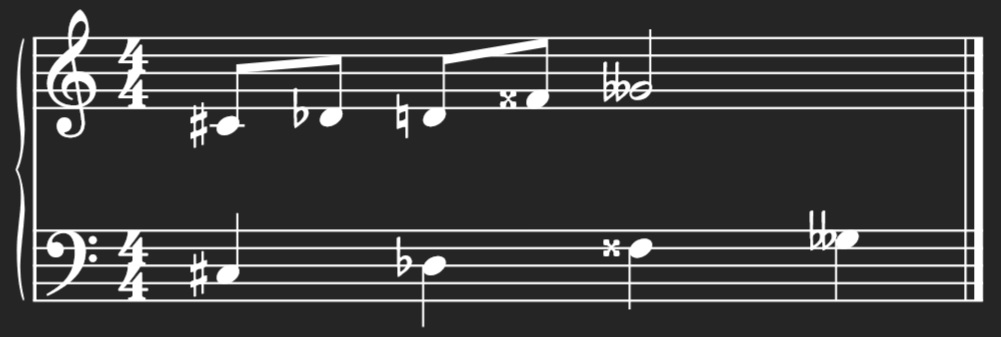
- The Sharp (♯): Looks like a slanted hashtag. It tells you to raise the pitch by playing the very next physical key to the right. (Usually, this means stepping up from a white key to a black key).
- The Flat (♭): Looks like a pointy lowercase 'b'. It tells you to lower the pitch by playing the very next physical key to the left.
- The Double Sharp (𝄪): Looks like an 'x'. It tells you to step up by two keys. For example, an F𝄪 actually lands on the G key!
- The Double Flat (𝄫): Looks like two flat symbols squished together. It tells you to step down by two keys.
- The Natural (♮): Looks like a square with vertical sticks. This is the "undo" button. It cancels out any sharps or flats and brings the note back to its original white key.
The Bar Line Reset Switch
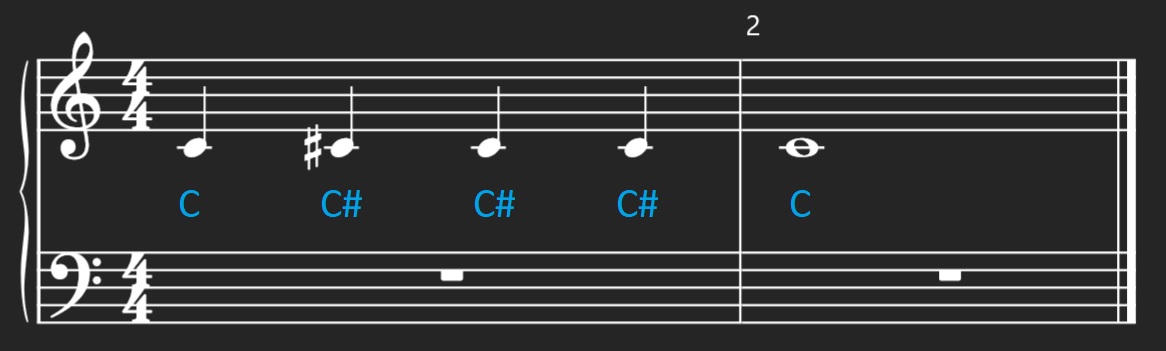
Composers hate drawing the same sharp symbol 50 times in a single measure. So, there is a universal shortcut: An accidental carries through the entire measure. If the second note of a measure is a C♯, every other C in that exact measure is also a C♯, even if there's no symbol next to it!
But here is the most important part: the bar line acts as a reset switch. The second you cross into a new measure, all those accidentals are wiped clean, and notes go back to their natural state unless a new symbol is drawn.
Self-Check Questions
- Question: You play an F♯ on Beat 1. On Beat 4 of the same measure, there is an F with no symbol written next to it. Which physical key do you press?
Click to reveal answer
Answer: The F♯ key! (The accidental applies to the whole measure). - Question: Does a flat symbol direct your hand to move to the left or to the right on the physical keyboard?
Click to reveal answer
Answer: To the left (down in pitch). - Question: What does a double flat (𝄫) actually do to a note?
Click to reveal answer
Answer: It lowers the pitch by two physical keys (a full whole step). - Question: Does a bar line cancel a sharp?
Click to reveal answer
Answer: Yes. The bar line acts as an automatic reset button, returning the note to its natural white key for the next measure.
Practice Session: Catching the Black Keys
The Goal: Train your hands to reach comfortably for the black keys and train your brain to remember accidentals through the whole measure.
The Execution: Open JazzPianoLab and run through these Sight-Reading exercises:
- 15.1 Stepping Up with Sharps: Read a melody of white keys peppered with sharps. Train your hand to comfortably reach slightly forward and right.
- 15.2 Stepping Down with Flats: The same idea as with sharps, but reaching slightly forward and left to catch the flat keys smoothly.
- 15.3 The Bar Line Test - Sharps: Play measures packed with altered notes, but remember to reset your hands back to the natural keys the second you cross the bar line!
- 15.4 The Bar Line Test - Flats: Play measures packed with altered notes, but remember to reset your hands back to the natural keys the second you cross the bar line!
- 15.5 The Accidental Obstacle Course: A full mix of sharps, flats, double sharps, double flats, and naturals to really test your new reflexes.
Don't have JazzPianoLab yet?
Reading about theory is only half the battle. To truly learn sight-reading, your hands need to react instantly. Plug in your MIDI keyboard and let our interactive engine guide you through these exact exercises.
Start 7-Day Free Trial (No Credit Card)Ready to build your musical foundation?
Unlock Interactive Practice for this course and the entire JazzPianoLab training library today.